Product personalization has become a major challenge for brands, manufacturers and healthcare professionals. Customers increasingly expect products that are adapted to their needs, their morphology and their specific use cases.
This is where the 3D face scan brings real value. Thanks to mobile 3D scanning, it is now possible to capture facial morphology directly from a smartphone, without specialized hardware or a dedicated 3D scanner.
The generated 3D face model can then be used to design custom-fit products, support virtual try-on, create 3D avatars, recommend the right size or integrate facial data into professional workflows.
In this article, we explain how a 3D face scan from a smartphone works, and how it can help brands, manufacturers and healthcare professionals personalize products, improve the customer experience and simplify their business workflows.
The benefits of 3D scanning for product personalization
What is 3D scanning?
3D scanning, also known as 3D digitization, is a technology used to capture the shape, volumes and specific features of an object or a body part. This data is then converted into a three-dimensional digital representation that can be used to design personalized products.
For a long time, this technology relied on dedicated equipment, such as laser scanners or structured light scanners. Today, mobile 3D scanning offers a more flexible approach through photogrammetry, which makes it possible to generate a 3D model from multiple images captured with a smartphone.
3D digitization is used in many fields, including healthcare, industry, fashion, luxury, art and culture. For brands, manufacturers and healthcare professionals, it opens up new opportunities to create custom-fit products, support virtual try-on and improve the customer experience.
With a solution like MyFit Solutions, a 3D face scan can be performed directly from a smartphone, without a dedicated 3D scanner or complex hardware to deploy. This approach makes facial morphology capture more accessible, more scalable and easier to integrate into business workflows.
What are the benefits of 3D scanning with a smartphone?
3D scanning with a smartphone offers many benefits for professionals who need to capture facial morphology without a dedicated scanner. It makes 3D digitization easier to deploy, faster to use and simpler to integrate into existing business workflows.
- The first benefit is speed. 3D capture can be performed in just a few seconds, directly from a smartphone. This simplicity helps streamline the experience, whether the scan is performed in store, in clinic, in the field or remotely.
- The second benefit is data reliability. A 3D face scan can generate a model that reflects the user’s facial morphology, with usable data for custom-fit product design, virtual try-on, 3D avatar creation or advanced personalization use cases.
- The third benefit is reduced hardware costs. The smartphone becomes the main capture tool, without requiring a dedicated 3D scanner, an external sensor or complex equipment to maintain.
Finally, mobile 3D scanning improves accessibility. Brands, manufacturers and healthcare professionals can integrate this technology more easily into their processes, with fast onboarding and a more scalable deployment.
How to scan a face in 3D?
To obtain a usable 3D face scan, a few conditions remain essential: preparing the person properly, capturing the right angles, limiting movement and ensuring sufficient data quality for 3D reconstruction.
With traditional scanners, this capture process can be complex. It often requires dedicated equipment, a trained operator and a rigorous scanning method. Here are the main steps usually required.
1. Use anatomical landmarks
To scan a face in 3D, it is important to rely on anatomical landmarks. The ears, nose, chin or certain areas of the skull can be used as references to guide the capture and ensure a consistent reconstruction.
Without guidance, this step can be difficult to perform, especially with a traditional 3D scanner that often requires real technical expertise.2. Capture all relevant areas of the face
During facial scanning, all useful areas must be properly captured: facial contours, cheekbones, nose, lips, eyes, eyebrows, ears and jawline.
With conventional 3D capture tools, training is often required to know which angles to capture, how to move the scanner and how to avoid missing areas in the 3D face model.3. Maintain a constant distance
The distance between the capture tool and the face must remain consistent throughout the scan. This stability helps reduce distortions and generate more homogeneous data.
With a dedicated 3D scanner, this constraint can be difficult to manage: the equipment may be heavy, less intuitive to handle and the risk of having to repeat the scan remains high.4. Clear the face and head
To improve scan quality, the face must be clearly visible. Hair can hide certain areas or create defects in the 3D reconstruction.
Depending on the use case, it may therefore be useful to pull the hair back or cover it with a cap in order to obtain a cleaner capture.5. Stay still during capture
The person being scanned must remain still and keep the same facial expression throughout the capture. Movements of the face, head or eyes can disrupt the reconstruction and reduce the quality of the final model.
Today, MyFit Solutions simplifies this process with mobile 3D scanning. From a smartphone, it becomes possible to capture the face through a guided experience, without a dedicated scanner or complex equipment, and generate a 3D face model that can be used in professional workflows.
3D face scanning from a smartphone with MyFit Solutions
How to perform a 3D scan with a smartphone
3D scanning via smartphone is becoming a concrete lever for brands, manufacturers and healthcare professionals who want to personalize their products based on the real morphology of their customers or patients. It helps improve the user experience, support virtual try-on and reduce product returns in online or remote sales journeys.
Unlike traditional scanning solutions, often associated with dedicated, expensive and more complex machines to deploy, the smartphone offers a simpler and more accessible approach. With MyFit Solutions, 3D capture can be performed from a widely available tool, without a dedicated 3D scanner or specialized hardware.
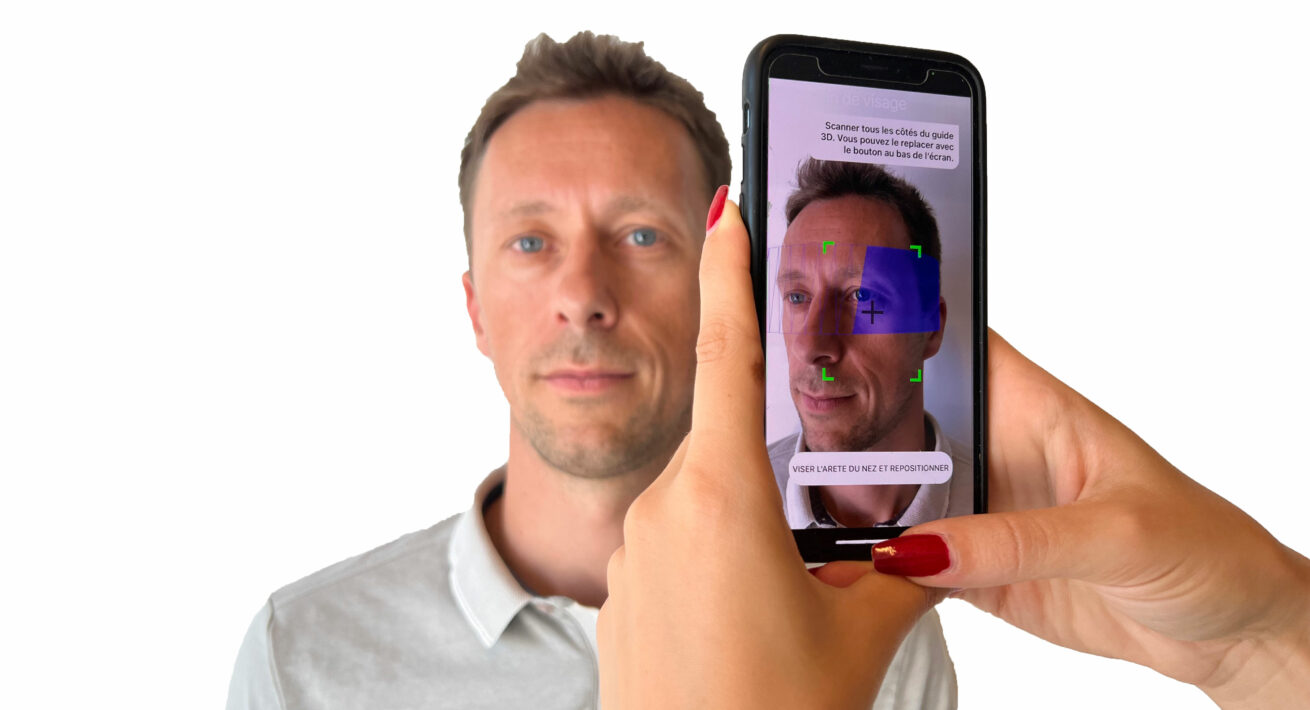
The process is designed to be easy to use. The person is guided throughout the capture, without physical contact, simply by keeping the phone at the right distance and following simple movements around the face.
Once the scan is complete, the 3D model can be used in professional workflows. Precise, to scale and adapted to business use cases, it can help design custom-fit products, enrich the customer experience or integrate morphological data into existing tools.
A guide to a successful 3D face scan
At MyFit Solutions, 3D face scanning is designed to be guided from start to finish. The goal is to make capture simpler, faster and more reliable, even without technical expertise.
Once the application is installed on the smartphone, the user is guided through each step to complete the scan in the best possible conditions. This guided experience helps reduce capture errors and obtain a usable 3D model from the first attempts.
The application provides three main levels of assistance:
- Positioning: it indicates the right distance to maintain between the smartphone and the face being scanned.
- Movement: an on-screen guide helps the user perform the right movements during capture.
- Coverage of useful areas: the application shows which areas have already been captured and which still need to be scanned.
With this guided scan, MyFit Solutions simplifies 3D face scanning and makes it easier to integrate into professional workflows: product personalization, virtual try-on, 3D avatar creation or morphological analysis.
Which parts of the face can be analyzed with a 3D scan from a smartphone?
A 3D face scan can capture different morphological areas that are useful for creating custom-fit products, recommending the right size or improving virtual try-on.
The eyes, eye distance and nose area
The eye area is essential for many use cases, especially in eyewear. With a 3D face scan, it becomes possible to analyze morphological data such as eye distance, face width, nose position and the volumes around the cheekbones.
This information can help opticians, eyewear brands and marketplaces offer a more personalized experience. Beyond virtual try-on, 3D data can support frame size recommendation and help suggest eyewear that is better adapted to the customer’s morphology, with a better fit and improved comfort.
Prescription glasses, sunglasses, ski goggles, medical respiratory masks and protective equipment can all benefit from this approach. The 3D scan provides usable data to identify the right size, adapt an existing product or design a custom-fit device.
Online or in store, this technology helps professionals take measurements more easily, directly from a smartphone. It streamlines advice, personalizes the customer experience and reduces errors linked to manual measurement.
The mouth and lips
The mouth and lips can also be analyzed through a 3D face scan. This area has complex shapes, with volumes, curves and proportions that are specific to each person.
In beauty, care or healthcare sectors, access to a precise 3D face model can help professionals better adapt a product or device to facial morphology. This makes it possible to work from more reliable data to improve fit, comfort or the final result.
In healthcare, 3D face scanning can also support certain types of follow-up, especially in maxillofacial reconstruction. Regular captures make it possible to compare morphological changes over time, monitor progress and support decision-making for healthcare professionals.
With a mobile solution, this data can be captured more easily, in clinic or remotely, without a dedicated 3D scanner. The smartphone therefore becomes a more accessible tool for monitoring and personalization in professional use cases.

The head as a whole
3D scanning can also capture the head as a whole, including the shape of the skull, face, eyes, nose, mouth and jawline. This global view provides morphological data that can be used to design products better adapted to each person.
In sports, healthcare or protective equipment, this data can be used to develop custom-fit helmets adjusted to the real shape of the head. It can also support remote size recommendation, based on digital measurements rather than manual estimation.
For brands and manufacturers, this approach opens the door to products that are more comfortable and better fitted, while simplifying online or remote purchase journeys.
With mobile 3D scanning, head capture becomes more accessible: it can be performed from a smartphone, without a dedicated 3D scanner, then integrated into design, size recommendation or product personalization workflows.
What are the practical applications of a 3D face scan?
3D face scanning can address two major needs for brands, manufacturers and healthcare professionals: creating personalized or custom-fit products, and recommending products that are better adapted to each customer’s or patient’s morphology.
With a 3D face scan, it becomes possible to precisely model different areas of the face and head. This to-scale 3D reconstruction provides usable data to design better-fitting products, improve size recommendation or enrich the purchase experience.
For professionals, the value is twofold: adapting products more closely to each morphology, while integrating this data into existing workflows. The smartphone then becomes a simple, mobile and scalable capture tool that supports product personalization without requiring a dedicated 3D scanner.
Designing custom-fit masks
A 3D face scan can be used to design masks adapted to each person’s morphology. In healthcare, sports, mobility or protective equipment, the goal is often the same: creating a device that is well fitted, comfortable and effective.
Respiratory support masks, for example, need to closely follow the volumes of the face to reduce pressure points, improve sealing and support better daily use. A precise 3D face model can help design a mask that is closer to the real anatomy of the patient or user.
This is also a key challenge for masks used in sleep apnea treatment. To be worn throughout the night, despite movement, the device must provide good support without creating discomfort.
With mobile 3D scanning, professionals can capture facial morphology from a smartphone, then use this data to personalize the design, recommend a size or adapt an existing product. This approach helps create masks that are more comfortable, better fitted and more personalized.
Creating custom-fit eyewear with 3D digitization
3D face digitization can also be used to design custom-fit eyewear. By capturing facial morphology, it helps take into account the width of the face, the position of the nose, eye distance and even temple length.
This data can help opticians, eyewear brands and marketplaces offer frames that are better adapted to each customer. The goal is to improve fit, comfort and the purchase experience, both online and in store.
For professionals, a 3D face scan brings several benefits:
- designing products adapted to the real morphology of the customer or patient;
- improving the comfort and effectiveness of medical devices;
- simplifying measurement through a smartphone;
- obtaining a remote 3D face model that can be used to analyze useful shapes and dimensions.
3D face scan: a lever for personalization at scale
In summary, a 3D face scan is becoming a valuable tool for brands, manufacturers and healthcare professionals who want to personalize products or recommend better-adapted solutions. Thanks to smartphones, 3D capture becomes simpler, more accessible and more scalable.
At MyFit Solutions, we develop mobile 3D scanning solutions to simplify facial morphology capture and integrate usable 3D models into professional workflows.